

Title numbers you can stand behind.
Installs in minutes on the server you already run SoftPro on. Your data never leaves your network.
What it costs to run on numbers you don't trust
Staffing, pricing, or a conversation with an underwriter, built on a figure nobody can trace back to its source.
Someone pushes back on a figure and the answer is "let me go rebuild it" — because the last person who pulled it did it differently.
The usual fix for reporting is a copy of your production database in somebody else's cloud, and one more vendor on your security review.
What you get instead
Every metric is defined once, in the application, and calculated the same way every time — no matter who opens the report.
EscrowIQ reads your SoftPro Select database on your own server and renders every report there. See the architecture.
$199/mo for the whole platform and unlimited users. One plan, no tiers, nothing gated.
You shouldn't have to caveat your own report.
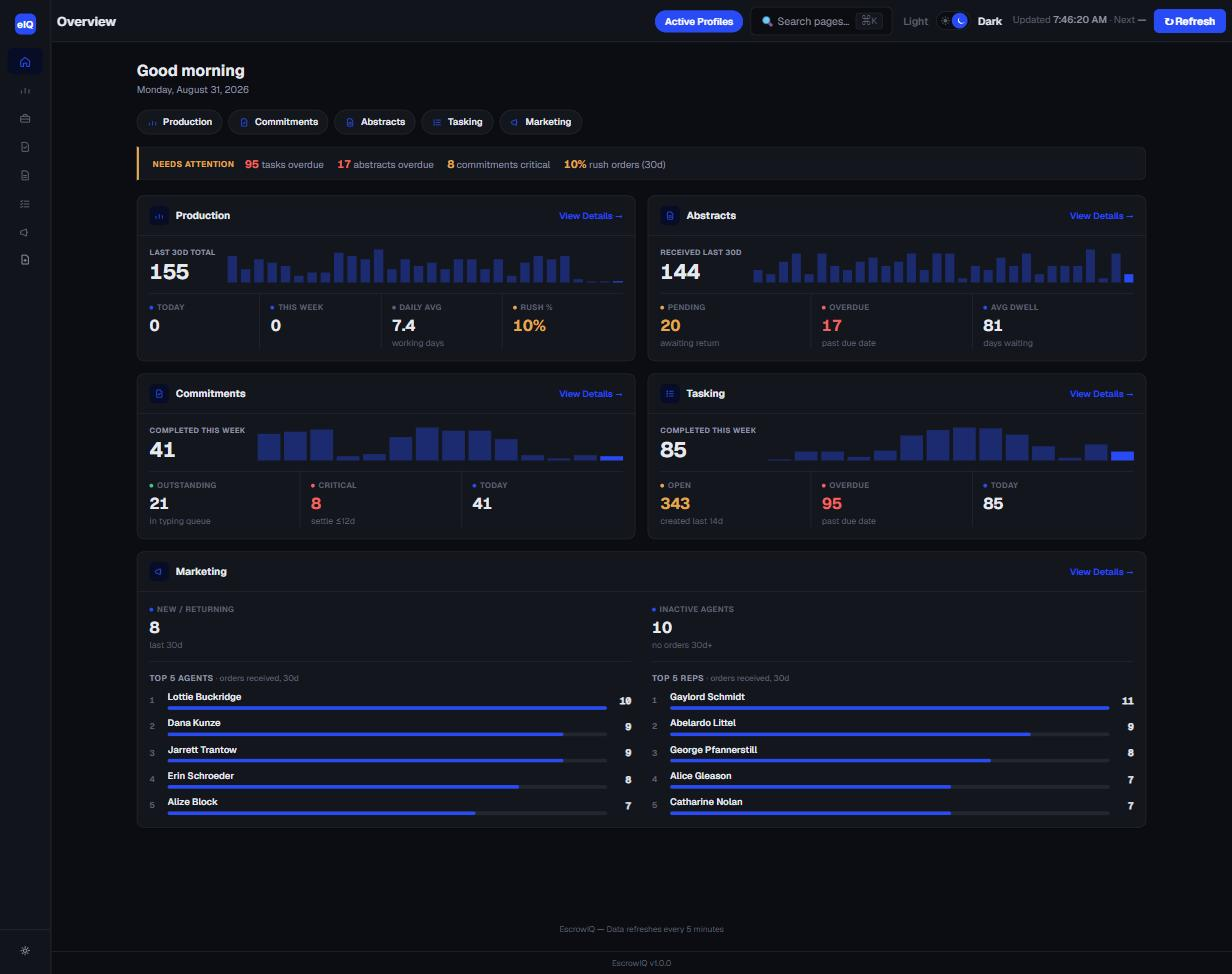
22 reports, six sections
What operators get
Your file types, profiles, and offices
Order prefixes, profiles, closing offices, contact-type mappings, and task descriptions are configured per installation, so reports match how your agency actually files work.
Task and queue visibility
Open tasks by age, overdue work, workload per escrow officer or assistant, and per-file checklist status — the operational layer under the volume numbers.
Permissions by AD group
Sections and individual pages can be restricted to Active Directory groups. Executive revenue views stay with the people who should see them.
Reports that arrive on their own *
Any report page can be scheduled as a PDF, image, or CSV and emailed to a recipient list on a recurring basis. Nobody needs to be logged in for a send to fire.
* Add-on — scheduled report delivery is not included in the base license.
How you get there
A few minutes on the server you already run SoftPro Select on. One connection string, and it is reading your live database.
Your prefixes, profiles, offices, and task descriptions are mapped once. Every metric is defined once and calculated the same way every time.
Weekly decisions and monthly reporting from numbers that hold up when somebody asks where they came from.
What EscrowIQ is
EscrowIQ is an on-premise operational reporting tool for title and escrow agencies that installs alongside SoftPro Select and gives owners and operations managers accurate, consistent numbers without moving client data off their network. Most title agencies can't fully trust their own numbers: the reports are slow, hand-built, and inconsistent, and the answer changes depending on who pulls them. The usual fix means copying client data to another vendor's cloud and adding one more name to your security review. EscrowIQ installs in minutes on the server you already run SoftPro on, reads the database read-only, and publishes 22 standing reports across production, commitments, abstracts, tasking, marketing, and executive views. Every metric is defined once and calculated the same way every time, so you get one operating picture you can stand behind — and your data never leaves your network.
The full platform, one installation, unlimited users. Annual contract. Optional scheduled reports add-on at +$49/mo.
See what's includedQuestions
What reporting tools work with SoftPro Select?
EscrowIQ is a reporting application built specifically for SoftPro Select. It installs on a Windows server inside your own network and reads the same SelectDb database your SoftPro installation uses, so there is no export, no data warehouse, and no copy of your files anywhere else. Agencies also use general-purpose BI tools against SelectDb, but those require someone to build and maintain the queries and metric definitions themselves.
Can I get dashboards from SoftPro without moving my data to the cloud?
Yes. EscrowIQ runs entirely on a server you control. It connects to your SoftPro Select database with a read-only SQL account, renders every report in your own memory on your own server, and serves it over your own IIS site to users your Active Directory already authenticates. No report data and no SoftPro data is transmitted anywhere.
How long does EscrowIQ take to install?
Minutes. EscrowIQ publishes to an IIS site on a Windows server running .NET 8, and one connection string points it at your existing SelectDb. Configuration — your order-number prefixes, profiles, closing offices, contact-type mappings, and task discovery — follows in an admin session, and an install and configuration session is included in the price.
Does any data leave my network?
Two things, and this is the complete list. First, a license check-in runs a few times a day and sends your license key, a stable install identifier, and the app version — no SoftPro data, no report data, no customer or staff information. Second, if an admin turns on the optional Report Subscriptions add-on and configures it, the specific report they chose is emailed on the schedule they set to the recipients they listed. Nothing else is transmitted, and there is no analytics, telemetry, or crash-reporting SDK in the application.
How much does EscrowIQ cost?
$199 per month per installation on an annual contract. That includes the full platform — all 22 reports across six sections — and unlimited users. Scheduled report delivery is an optional add-on at $49 per month. There are no tiers and nothing is gated behind a higher plan.
Why do my title reports show different numbers?
Almost always because the metric is defined differently each time it is pulled. "Closed files last month" depends on whether you count by closing date or disbursement date, whether cancelled files are excluded, and which profiles and offices are in scope. When every report is hand-built in Excel, those choices are re-made each time. EscrowIQ defines each metric once, in the application, so the same question returns the same answer regardless of who asks it.
What permissions does EscrowIQ need on my SQL Server?
Only db_datareader on your SelectDb. Every query the application issues is a SELECT; there is no code path that writes, updates, or deletes SoftPro data. You can verify this by granting read-only access and confirming the application works normally.
One operating picture you can stand behind.
Thirty minutes against sample SoftPro data, plus exactly what an install in your environment would involve.